Simple server-side scripting with ASP.NET Razor

With the introduction of .NET framework and ASP.NET in the late 1990s, the legacy HTML embedded single page web application model of ASP is replaced by the Web Forms (and later ASP.NET MVC model). While the new ASP.NET models brought many new possibilities and made it easier to create enterprise web applications, the simplicity of legacy ASP was left behind.

Continue reading “Simple server-side scripting with ASP.NET Razor”

Using .NET like attributes for D365 FO child class constructors

Previously, we used to define class constructors like below if we want to switch correct child class via a parameter :

public static AtTest constructFromCommon(Common _common)
 {
 AtTest ret;

switch(_common.Tableid)
 {
 case tableNum(CustTable) :
 ret = new AtTest_Customer(_common);
 break;
 case tableNum(VendTable) :
 ret = new AtTest_Vendor(_common);
 break;
 }

return ret;

}

Since AX 2012, we have the ability to create and use .NET like attributes and in D365 FO they are widely used in the extension framework.

Continue reading “Using .NET like attributes for D365 FO child class constructors”

Generating deep links for D365 FO forms and records

Dynamics 365 FO has an API to create URL links that point to certain forms and records, in other words “Deep links”. This way you can share a record or query within AX with others for example within an e-mail, or inside an extensible control you have written.

Below I give an example method, used in a runnable job, which generates a deep link for a record on a form, using a single field as a query parameter. To be able to test it, cop and paste the code into a runnable class and run it in USMF company of D365 one-box development environment:

Continue reading “Generating deep links for D365 FO forms and records”

D365 FO Chain of command with examples

As of platform update 9 of Dynamics AX for Operations, we have a new extension possibility called chain of command. Now we are able to add pre and post functionality to extensible methods in a much easier and readable manner than the previously used event handlers, also we are now able to access protected methods and variables directly in the extended class without problems.

Now let’s check how it works with an example. Create two classes, one is the base class of the other and add a method we want to extend called ‘testMe’. Add infolog calls inside the method to track the execution :

Continue reading “D365 FO Chain of command with examples”

Using 3rd party Web components in D365 FO; an introduction to extensible controls

AX7 allows you to develop new user interface components called ‘extensible controls’ using HTML, Javascript and other web programming technologies. You can also integrate any of the thousands of existing web based plugins and code libraries inside AX user interface and use them directly with AX data. Building ‘extensible controls’ in AX offers endless possibilities to enrich standard AX7 user interface and forms.

However, learning how to write an extensible control is a subject of its own. It is not straightforward and simple as programming other parts of AX and I think having a good knowledge in HTML and web programming is a must to be able to understand it. The documentation and github examples provided by Microsoft is limited, but by studying the functionality yourself, doing examples and examining existing controls in AX7 webroot folder, pieces of the puzzle start to fit together.

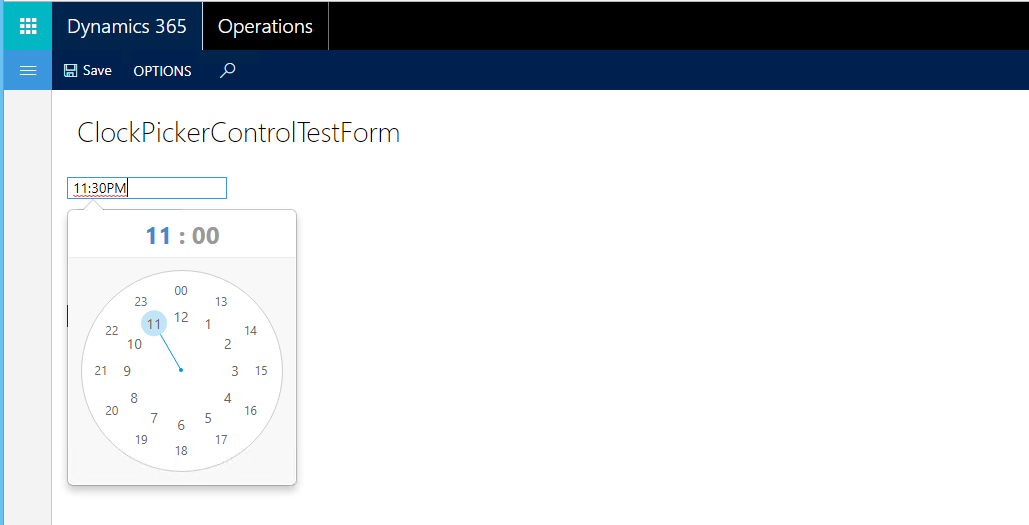
Here in this article I will show the basics of how to integrate a third party web plugin and use it in an AX7 form. I have chosen weareoutman’s ClockPicker as an example and will show how to create an alternative, better looking AX time edit control with this plugin and add it to AX forms:

Continue reading “Using 3rd party Web components in D365 FO; an introduction to extensible controls”

Using base64 encoding and decoding for file transfer in AX 2012

If you want to transfer small file data using AX and do not want to make use of shared folders or file uploading, sending your file directly inside your XML message as base64 encoded string is a good option. Base64 gives you the possibility to encode your binary data as text and transfer it inside text based message types like XML and JSON and decode it back as a file on the receipt.

For big files though, like 10MB and bigger, I recommend using binary file transfer instead of base64.

Ax 2012 has built in support for decoding and encoding base64 data type with some missing things and drawback we will mention in this article. I do recommend using AX standard methods to do it and not .NET equivalents in AX 2012, because I doubt marshalling such huge amount of data between CLR Interop and AX performs good enough.

Continue reading “Using base64 encoding and decoding for file transfer in AX 2012”

D365 FO Extensibility – Part 3 : Event handlers and delegates (hooks)

In the previous blog post we had a look at the possibilities of adding new methods and variables to existing AX7 program code using extensions. What if we need to modify, or add extra functionality to existing methods or events on existing classes, tables and forms? In that case we use AX7 events and delegates (also called ‘hooks’).

There are already plenty of events (hooks) we can subscribe in AX and extend the existing functionality without overlayering or overriding the function we need to extend. You can find those under the “Events” node of the application objects. Subscription is as easy as right clicking and selecting “Copy event handler method”, then you need to paste it into an eventhandler class and write your own logic inside:

public static class ExtensionDemoInventTableEventHandlers
{
[DataEventHandler(tableStr(InventTable), DataEventType::Deleted)]
public static void InventTable_onDeleted(Common sender, DataEventArgs e)
{
 InventTable inventTable = sender as InventTable;

//Your logic
}

}

Continue reading “D365 FO Extensibility – Part 3 : Event handlers and delegates (hooks)”

D365 FO Extensibility Overview – Part 2 : Code extensions

We have seen an overview of what we can do with application object extensions in the first part of this blog. Now what if we want to modify the program code or add new methods and variables to the program code of an existing object in AX7? It is possible to do it in various ways in AX7 (or D365O).

First method is of course the legacy method of creating a derived class which we want to extend, adding or overriding base methods in it and use this class in our new model instead of the base class. This solves many of the customization work we need but there might be cases this method is not desirable or we cannot modify the code of existing tables and forms like that.

Second option is to create something new called an ‘extension class’ to extend the program code of an existing object. This is simply done by creating an extension class with the template shown below using the ‘ExtensionOf’ attribute:

Continue reading “D365 FO Extensibility Overview – Part 2 : Code extensions”

D365 FO Extensibility – Part 1 : Application object extensions

In AX7 (or D365 for ..), we have two options to customize objects from an existing package, which are overlayering and extensions. On model creation, if you do not choose the package you want to modify using “Select existing package” option you create an extension model and can only change existing objects using the new AX7 extension possibilities. In this article I will mention about the basics of creating extensions (as of update 3 version), give you some tips and try to collect all together various different methods for creating extensions you can find on other resources on internet.

Extensions have several advantages over overlayering method and essential to keep your customizations ‘minimally’ affected from the system modifications done on the lower layers, like hotfixes or service packs. Using extensions instead of overlayering more than “highly recommended” by Microsoft and it seems extensibility is becoming the new modification way for the existing application elements than overlayering. It is already becoming mandatory for all ISVs and might become mandatory in the future for customer projects as well. So I recommend either not using overlayering or using it as few as possible to avoid any such workload of converting everything to extensions in the future.

Continue reading “D365 FO Extensibility – Part 1 : Application object extensions”

Synchronous and asynchronous operations in D365 F&O

Revised in October 2025,

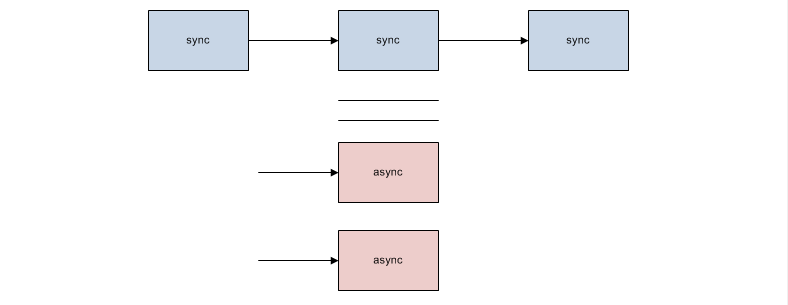
In D365 F&O, we have various new ways to execute time-consuming operations in the web client. We all know the feeling that if we want to execute a time-consuming operation on an AX form, that operation blocks all the user interface until it is completed, showing a white screen or a waiting message. To prevent this, in AX 2012, we used either the progress bar to display the operation progress to the user, or some asynchronous execution possibilities like the Thread API or xApplication::runasync() method to run the operation in the background.

In D365 F&O, optimizing our time-consuming operations is extra important because we are running them on a web-based interface, which will be blocked or run into a timeout if we run such a long operation. For that reason, optimizing our execution time and leaving the user interface free for the user with asynchronous execution is important and recommended. We already see it is being used in many new forms of D365 F&O, like the new data import form.

Now, let’s have a look at the different possibilities we have for running time-consuming operations in D365 F&O. To test them, we create a simple form like this :

Continue reading “Synchronous and asynchronous operations in D365 F&O”